Before
After
Sample messages:
What the tool understood
Each field shows where it came from.Open slots from the calendar
Sample calendar, demo date Mon, Nov 16Draft reply
Not sent · waiting for approvalEdit freely. Nothing is sent from this page, and in a real build nothing goes out until a person approves it.
Follow-up lists
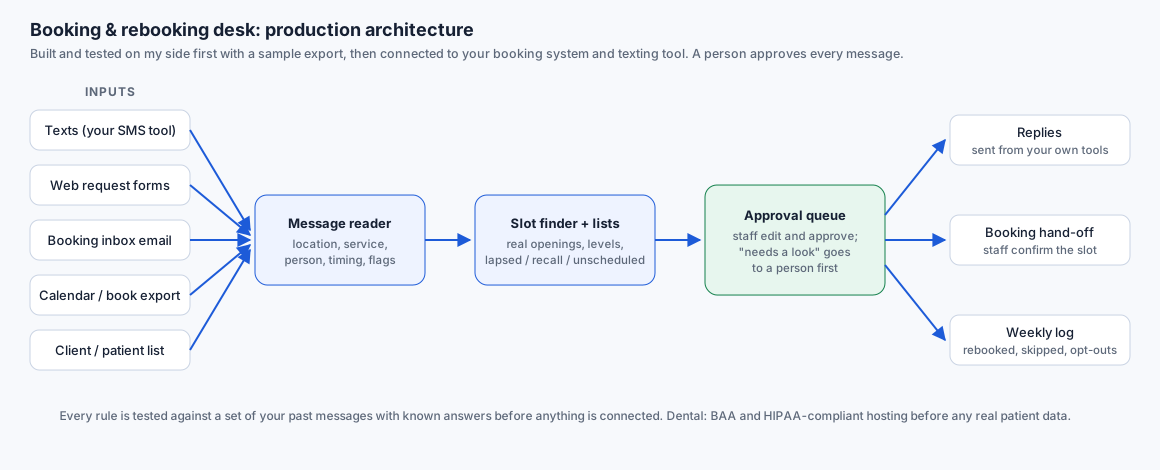
How it works
- Read. Each text, web form or email is read for who it's from (matched to the client record by phone or email), what they want, which location, which person and when. Every field is marked clear, assumed (for example from their usual stylist) or needs a look. This page uses a deterministic rule reader; a production build adds a language model held to the same field list, with these rules kept as a test check.
- Find real openings. Slots come from the calendar itself: working hours, existing bookings, service length and, for salons, the stylist level a service needs. Nothing is offered that isn't free.
- Hold, don't guess. Complaints, refunds, unclear requests, two locations at once, and in dental mode any mention of pain or swelling or a cost question go to a person with a holding draft and no slots. The tool never assesses symptoms or suggests treatment.
- Draft, then approve. Replies and follow-up drafts sit in a queue. Staff edit and approve; in a real build approved messages go out from your existing texting tool or inbox. Opted-out clients are skipped.
- Follow up. Lapsed regulars (past their usual gap), overdue recalls and recommended-but-unscheduled treatment become lists with drafts offering their own provider's openings. Dental drafts carry plan IDs only, with estimate clarity notes for the coordinator.
Production architecture